
FAQ
1. "A JavaScript error occurred in the main process"
This could be many things to do with the installer or Discord's JavaScript files. If your installer is out of date, PLEASE UPDATE!
2. "Patching C:\Users\user\AppData\Local\Discord. ERROR Didn't find desktop.asar"
Your Discord install is likely messed up. Please follow this:
- Press
Windows+R. - Type
%AppData%and delete the Discord folder. - Repeat for
%LocalAppData%. - Install Discord.
OR do a clean reinstall using the guide on corrupt Discord installations.
Simplified Steps
- Hold the Windows Key and press
R. Type%AppData%and click OK. - Delete the Discord folder.
- Repeat the same steps for
%LocalAppData%and delete the Discord folder. - Install Discord again. Quick download links:
3. "Something went wrong. Please check the logs above."
This could be Windows Defender blocking SudoCord's CLI installer. Please disable or add an exclusion. Learn how to add an exclusion in this article.
4. "Discord Activities aren't working!"
This could be because of OpenASAR. Simply uninject OpenASAR from Discord. This can be done by opening the Sudotl installer.
- CLI:
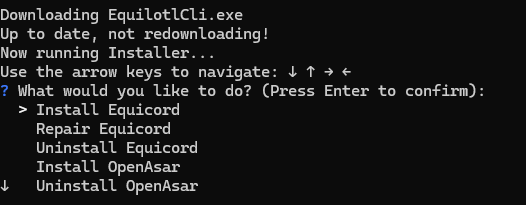
- GUI:

5. "The update button says an error happened!"
Try running the update again — it is usually a network hiccup. If it keeps failing, update manually:
git fetch origin
git reset --hard origin/main
pnpm build
(only needed if you installed from source; setup installs fix themselves on the next update attempt)
6. "I have a different issue!"
For any other issues, please open an issue on GitHub or ask on the website.